Showing posts with label cybook. Show all posts

Wednesday, July 8, 2009

New Bookeen Reader Soon -- The Opus

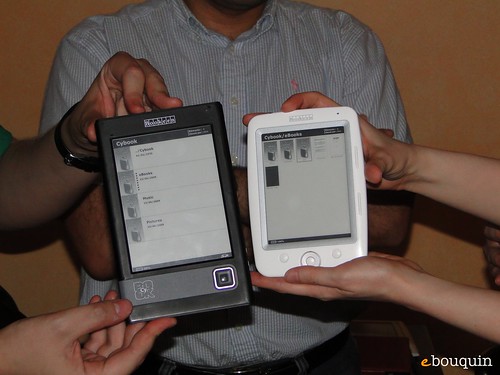
Bookeen, the maker of the Cybook, are showing off thier new reader called the Opus. Shown below is a picture that compares the current Cybook with the New Opus. Was originally supposed to be available in June . . .

MobileRead lists the new specs below:

  • 5" high definition e-ink screen (200dpi, 600x800 pixels)
  • Ultra light-weight : 150 grammes.
  • 1go internal memory (twice the capacity of the Cybook Gen3)
  • Truly pocket-sized !
  • Excellent ergonomy with convenient well-placed page-turning buttons on the side of the screen for one-handed use.
  • An accelerometer allows you to use it in either hand.
  • ePUB and PDF support (with or without DRM) via the Adobe Reader Mobile SDK. 12 different type sizes
  • Folder support !
  • User replaceable battery.
  • Memory card expansion slot (Micro SD).

Here are a lot more pictures (and more info if you read french)

Looks like an interesting alternative. Stay tuned for actual release date and pricing.

Monday, April 21, 2008

eBooks on the Small Screen

Last Wednesday morning, while eating breakfast and scanning the Wall Street Journal, I stumbled across an article by Lee Gomes.  He wrote a long piece about reading Ian McEwan’s novel “Amsterdam” on his Blackberry:

“Contrary to all of my previous expectations, not only was I reading the novel on my cellphone, I was enjoying it, too.

Until a few weeks ago, my assumption had been that a useable electronic book would need to resemble a Gutenberg book as much as possible, with, for example, pages of screen text about the same size as pages of print. I had heard reports that Japanese commuters were using cellphones to read books. But I figured that was sort of the thing only Japanese commuters would ever see fit to do."

I burst out laughing and handed the article to my husband.  Henri has long maintained that reading an eBook on a small device is a terrible idea.  He's not even interested in trying to read a book on a handheld device.  I have an ongoing (and so far unsuccessful) campaign to convince him to be more open minded.

He scanned the article and then grudgingly conceded that Lee might have a point.  He was quick to add, however, that he remained unconvinced.  And then he couldn't help himself.  He pointed out that I was possibly a hypocrite --  since I got my Cybook last November I haven't really used anything else for leisure reading.   

big palmThat evening as I was in the middle of reading Marisa de los Santos'  Belong to Me, my Cybook froze.  That is a story for another day (and it ended up to be no big deal).  The point of this story is that for the first time in six months I had use another device to finish the book.  

I had almost forgotten the reasons to read on a handheld device, but as I started to use the Palm they came back to me:

  • Backlit - I can read in the dark
  • Portable - I can have all my important info with me and still read anywhere
  • Touch Screen - easy to scroll and move around
  • Vivid Color - I really like color
  • Wireless - instant connectivity to the rest of the world

The bonus discovery:  the thumb button in the middle of the device is much easier to use and more intuitive than the button on the right side of the Cybook.  I also found that the ergonomics of holding and balancing the device were really comfortable.

There are really only two advantages to reading on the Cybook -- a bigger reading surface and the ability to read in bright and direct sunlight. 

I am not sure that those advantages really outweigh the advantages of reading on the PDA. specifically the touch screen and the wireless access. 

Just to check myself, I pulled out a very old Windows PC based PDA and charged it up.  All of the advantages of the Palm PLUS I was not so confined by the DRM.  Suddenly I could read protected PDF, Palm and MS Lit files. 

For the price of a Cybook or Sony Reader you can buy a Pocket PC that runs windows, has a touch screen, adds a keyboard and includes a cellphone. 

Friday morning I got the Cybook functioning again, but I'm still reading on the Palm. 

Of course, I am now actively considering upgrading my Verizon phone to an XV6800.

Turns out, that small screen isn't so bad after all!

Tuesday, January 15, 2008

Publishers don't get it -- An eBook should be more. . .

My 9 year old neighbor is a wired kid.  She loves computers and gadgets.  I got to wondering if she would have been more interested in The Daring Book for Girls if I had showed her the eBook edition on my Cybook.

Before suggesting it, however, I thought I would like to see what the eBook version was really like. I actually went to the store and bought it. 

After about five minutes, I came to the conclusion that it wouldn't have made one iota of difference.  Since the eBook version is no more compelling than the print version. 

All I could think was "What a waste!"

The Daring Book is basically an instruction manual. Unfortunately, the eBook version is a faithful rendition of the print version. 

The Mobipocket reader, which I was using, is a fairly sophisticated piece of eReader software.  When utilized fully it enhances the digital reading experience.  And yet, the publishers choose to create a flat, one dimensional product.  The eBook version has all the drawbacks of the paper edition and not one of the advantages of the digital experience.

Remember, this is a book specifically aimed at kids.  You know, those alien creatures around the house plugged into their phones, iPods, Gameboys and xBoxes. The ones that have been raised with computers, gadgets and multimedia. They know that life is a multimedia experience. 

And then there are books.  Books are a unimedia (print) or possibly a duamedia experience (print and graphic).  How can they possibly compete?

Guys, this is important:  An eBook is digital. 

The beauty of a digital book is that it has the capacity to be a multimedia experience that can compete.

Instead of line drawings of how to create a cootie catcher you can insert at the very least a link to a video.  Better yet, just insert a video clip.  It took me less than 5 seconds to find this YouTube piece. And you can't tell me that the creator of this video would not be happy to licence his creation to Harper Collins. 

Instead of just showing Spanish or French Terms of Endearment. Expressions and Other Items of Note you could easily attach a audio file that actually pronounces the words.  Who's to know that nuit is pronounced "knee we"?

Instead of listing thirty four living princesses, why not link to a picture of them?  And for those of you wondering where the hell Lesotho is -- add a map or a link to Google earth.

When you look at it dispassionately, you have to come to the conclusion that a unimedia experience is pretty bland.  Which makes me think that it is no wonder kids don't read.

Plain ole print is boring!

Tuesday, January 8, 2008

eBooks and the Perfect Reader

irexsonykindle There has been a lot of talk about eBook hardware in the last year:  the Irex Illiad, the Sony reader, the Cybook and finally the Kindle. Lots of press.  Lots of talk.

With each new device the questions arises:  Is this the new iPod for books?  Is this the piece of hardware that will take eBooks mainstream?  The "Killer Device" for eBooks?

The talk is seductive. I admit to having gotten a little sucked into that mind set.  I like the idea that somehow, someday there will be a "killer device" that will catapult eBooks into the next dimension.

This morning, while in the shower (I do my best thinking in the shower), it struck me -- the whole concept is totally fallacious.  It is, in fact, highly unlikely that there will ever be such a thing.

Think about it.  All over the world people are reading digital books.  Most of them read these eBooks on PCs, PDAs and mobile phones.

They aren't waiting for the perfect reader.  In fact they aren't even necessarily interested in a new gadget that will transform the whole electronic reading experience.  They are quite happy just as they are.  Thank you very much. 

Sure, there are some annoying inconveniences but basically, the technology is "good enough" for them just as it is.

cellphone girlMost of the "good enough" readers are young, hip and wired.  They are generally under 35 and grew up with computers, games boys and cell phones.  They are dexterous and have decent eyesight.  They think of books as something their parents read to them before they could play video games.  Alternatively, they think of books as some kind of bizarre punishment inflicted on them in the name of education. 

old man reading Most of the people waiting for the "killer device" think of books as iconic.  They seem to feel that the physical form of a book is somehow sacred.  After all, they grew up reading books, libraries were well funded and book stores were everywhere.  They expect the electronic reading experience to replicate the familiar print experience. 

In the end it is all about expectations and familiarity.  And then there is this:  the "good enough" generation is growing even as those waiting for the "killer device" are slowly and inexorably dying off.

Thursday, January 3, 2008

Cybook, America's Most Literate Cities and Reading eBooks on A Cell Phone

Sandy's Chatter About the Cybook

Sandy Schwab sent me her most excellent two part review of the Cybook and has generously allowed me to use part of it on my blog.  Cybook-in-hand

In the first piece  --  Introducing the Cybook she  describes the experience of receiving and opening the package; between her description and the pictures you feel like you are opening the package with her. 

She follows up with The Cybook in Action.  The piece gives you a great feel for the actual experience of using the Cybook.  If you are wondering about buying a Cybook this is RECOMMENDED reading!

After having my Cybook for a while and reading more than twenty books on it, I have gotten used to the inconveniences of the button navigation that she complains about.  And aside from a slight cramp in my right hand and a sore thumb, I have no complaints.

America's Most Literate Cities

Yesterday USA Today released its annual review of America's Most Literate Cities.The top 10 are compiled each year by Central Connecticut State University President Jack Miller. 

Miller ranks the nation's largest cities based on their "support for and commitment to reading".  Here are the top ten for 2007:tower of books

  1. Minneapolis
  2. Seattle     
  3. St. Paul
  4. Denver
  5. Washington, D.C.
  6. St. Louis
  7. San Francisco     
  8. Atlanta
  9. Pittsburgh
  10. Boston

His methodology and conclusions are worth reading, so go visit the America's Most Literate Cities site.

eBooks On Your Cell phone

For those who are unconvinced about eBooks -- here is a way to test reading on your phone that won't cdimeost a dime --  BooksInMyPhone.  The site gives away public domain titles.  They can be downloaded directly to your phone or put them on your PC and then transfer them to the phone.  The books have been formatted especially for the small screen.  I was truly impressed.  After all, I paid the phone and the books are free. . . All of you cell phone owners that are wondering about eBooks, I say "try it; you'll like it".

Tuesday, December 11, 2007

Technology is not the Point!

Henri Reynard weighs in on eBook Technology.  Henri presents his views on E Ink, the Kindle and what he really wants.

eink

A spate of eBook readers has hit the market recently with one or two yet to follow. The display candidate of the moment is the technology based on E Ink which rhymes with pink but has the visual value of oink to my eyes.

The background is gray and slightly hazy.  I do not think that the visual effects of a book are very well presented. AND they all cost over three hundred dollars.  A sum of money for which these days you can get a fully featured portable PC. Or for that matter more than half of an Iphone if you really like technology that much.

I am not a fan of any of the current crop of eBook readers but they are getting better at getting the size and weight close to right for the avid reader. E Ink readers have one major drawback: they are fragile and not as capable of living through a good drop to the floor from the bed – a criteria for books in my house.

My wife is a technocrat of the first order so I get to hold a lot of technology in these hands. New technology is not likely to impress me unless I think it will actually move the market. Take for example the Kindle, well named if you believe in burning books.

I seldom have used a book to start a fire, notice I did not say never. But the Kindle suffers from some interesting drawbacks. It is totally proprietary and makes no apologies about that fact. It also loses in the cost derby since it has no price advantage to go along with its other restrictions. Note that it cannot read protected PDF which is one of the most prevalent formats for eBooks sold today.

No! I think I will wait on a better technology than the current oink -- ER, E Ink -- crop before I buy another reader. Maybe the tablet PC will be back in a solid and simple light weight form before this is all over. An open standard and a really large memory with a lot of computing capability. Now that would be an eBook that didn't depend on a lot of new untried technology.

Wouldn't that be nice?

Friday, November 9, 2007

eBook Reader - My Cybook is here! (Continued)

You didn’t really think I would be able to wait until the weekend to download a book, did you? Of course not! I had to buy at least one book.

The entire process (including looking for books) took less than five minutes. It was the absolute easiest time I have ever had putting an eBook on a new device! Bottom line, I feel like I’m in a Staples ad: That was easy!

When I finished yesterday I had been pushing buttons in an effort to figure things out. Now it was time to actually download a book.

  • On your Mark: One of the things I discovered, sort of by accident, was the Mobipocket PID for the device. In case you are wondering here is what you do to find it: open any Mobipocket demo book; push the 2nd button on the left; scroll down the table to the Advanced tab; then scroll down to the About tab. VoilĂ  (had to get at least one French word in here)!

  • Get Ready: Connected the USB cord to my laptop, plugged the other end into the device and switched the Cybook on. Before long I was notified that I had new hardware – Cybook Gen 3. Just to check, I pulled up the file manager and it there it was – drive G on my machine. So far so good!

  • Go: Clicked on my handy eBooks About Everything icon, browsed the new releases put two Books -- Never Enough by Joe McGinniss and Telling Secrets by Frederick Buechner-- in my shopping cart and checked out. They showed very quickly on my bookshelf and I was ready to download them into the My eBooks file. Next, I fired up the Mobipocket reader and it found and registered the Cybook device in seconds. After that, it was a simple matter of importing the files into the reader and finally, storing them on the device.

As I started to read, using the big button on the right side of the device to change pages took a little “getting used to.” My habit is to turn the page on the left side or by using a button in the middle of the device. But getting used to this new method didn’t take as long as I would have thought.

I experimented with font size, type family, page layout and lookup mode. I also figured out that once in a book, the center of the big button would take me to the eBook menu so I didn’t have to fumble around with those little buttons on the side.

Over the weekend I will experiment with RSS and eNews feeds and give the device the acid test.

The acid test? Will my Mom be able to use it?

All in all – this has been a good experience and I am a happy customer. Sure there are a few changes and/or improvements I would like to see, but they are relatively minor and do not impact my overall satisfaction. Good job, Bookeen!

Thursday, November 8, 2007

eBook Reader - My Cybook is here!

Yesterday afternoon I got my Cybook . I made a very adult decision to wait until this weekend to actually play with it. Monday is a holiday and I should have some extra time. Right now, I have things to do, emails to answer, blogs to write and meetings to attend.

Mistake 1: I had to at least open the box and plug it in. After all, it does take three hours to charge.

Mistake 2: I picked it up -- you know, just to move it. I knew it was light but I struck with how light 6.3 oz. really is!

Mistake 3: Since it was in my hand, it seem logical to turn it on -- just to see if it really works. I am happy to report that it works.

The system came up quickly and all of the sudden I was in the Library -- thirty six preloaded files. The view was wonderful: clean, crisp and easy to read. Made me remember why eInk is such a big deal even if it isn't backlit.

And that was it. . .

I started playing. First, the big button on the front. It acts as a combine directional navigation and "Enter" key. Pretty miminalistic but effective. I found six small buttons on the sides (4 on the left and 2 on the right) with tiny unreadable (to these old eyes) symbols on them. I am quite intrigued by them especially, since they remain the "mystery" buttons on the device.

The half page quick start guide made a point of telling me that all would be clear if I read the User's guide. Despite my basic notion that anything that requires a manual is badly designed, I was actually willing to give it a whirl. So I scrolled around the Library looking for it.

Found music files, book files and picture files including one entitled "How eInk Works". No user guide! I went back through the titles 3 times, just in case I missed it.

Took a quick detour to email Bookeen asking about the User Guide. Got a very quick response (impressive) telling me that they would be sending it out to me today in eBook form.

Back to the eBook. Figured I would just start pushing the buttons and find out what happens. So this is what I found out:

  • one button takes you to the Library;
  • one button allows you to navigate in a book (start, find page, change layout, change font and add bookmarks);
  • one seems to control music.
  • The other three? Who knows? Guess I will have to wait for the user guide.
The device does not have a touch screen or stylus and I found that I actually miss them. I am in such a habit of poking and sliding around a screen that it felt strange not to be able to. Very disconcerting to me (a creature of habit).

I dipped into all the files on the device. . . pretty cool stuff. The thing that impressed me the most is that the page change is fast and smooth. No waiting, no ghosting and no jumpiness.

So that is my first take. Unfortunately, I really am out of time: email is stacking up, phones are ringing and I am due in a meeting shortly. Obviously, I haven't tried to download a book yet; that is a task for later (maybe that can wait until this weekend). I'll let you know how it goes.

My overall first impression? Positive. . .

To be continued

Tuesday, October 9, 2007

eBook Readers - eBook hardware overview

Since the demise of my Illiad, I have been reading on my Palm TX and mulling over the idea of buying a new eBook Reader. Last week was a bonanza week for eBook news:

  • Sony announced the PRS 505-SC; an upgraded version of the reader released earlier this year with more storage capacity and better speed.
  • Rumors of the Amazon Kindle imminent release are everywhere with much speculation on when and how it will be released. Last week “Kindle Edition” started showing up on random books
  • Bookeen delayed the release of their latest Cybook GEN3 offering until next month to add additional features.

Since I am an accountant at heart, I sat down and made a spreadsheet comparing these three eBooks. Decide to add my current Palm TX and a Treo (the Palm PDA smart phone) for kicks. After putting together a whole lot of info I realized that there are really only three things I truly care about (the rest are just fluff).

The Display – acuity and size

The Sony, Kindle and Cybook all have grey scale e-Ink screens which is notoriously fragile. The display is wonderful to read -- it really does look like paper and can be read even in the brightest sunlight. And yet, it is maddingly slow to refresh so that going from page to page requires a great deal of patience. And then there is the ongoing problem with ghosting (white shadow of the last page which lingers on). None of the e-Ink screens are backlit so you must always read in a relatively bright light.

The Palms use color TFT crystal displays and are backlit. Admittedly, they are a challenge to read in bright light, but you can take them to bed and read in the dark.

The e-Ink devices all have nice size screens more or less 5x7 which is the size of a regular book. The Palm TX screen is about 2 and by 3 which is adequate even if it is small. The Palm Smart Phone only has a 2x2 screen.

Available eBook formats and retailers

Sony is sticking to it’s proprietary format although it is still promising to add Adobe Digital Editions sometime “soon”. This means that you can only by new (as opposed to public domain) DRM protected books from the Sony Connect store. And no, publishers show no sign of letting go of DRM anytime soon. Which means that I wouldn’t even be able to read books from my own store.

The Kindle and Cybook both use the Mobipocket format. For the Kindle this makes sense, Amazon owns Mobipocket. Bookeen delayed the release of the Cybook specifically to add Adobe capability but no one knows if that is Digital Editions or the old fashion, basic PDF file. This gives me a wide range of retailer to pick from when I go to buy a book – I will of course be buying from eBooks About Everything.

The Palms read eReader and Mobipocket formats with ease, which also means I can buy books from a wide range of retailers including my own store.

Value for the Price

Value means the most bang for the buck, right? So if I spend money on a new reader, does the new device only read books or can I use it for something else? I want to be able to use any electronic device in a variety of ways – at the very least to read many types of documents.

All of these devices allow limited uses. You can read RTF and TXT documents on all of them. And they are all sorta useful in other ways. Being able to write is good; viewing pictures is highly desirable. Well, the e-Ink devices have a limited writing capacity but great screen clarity (and no color). The Palm has pretty good writing capabilities and let’s me see beautiful color photos. The Smart phone version even allows me to take them.

Finally, direct communication with the outside world is valuable. The Cybook, which only connects through a computer of some sort, gets and F in that regard. Purportedly the Kindle does allow you to connect to the internet in some fashion, but it is unclear if it is with the world at large or merely with the Amazon store. The Palms communicate freely; the cell phone model even lets you talk.

My conclusion – surprises even me!

Sony and Bookeen (Cybook) sure wants a lot of money for a pretty dumb machine. In the case of Sony the want $300 to read books that only they can provide. Bookeen wants the same or even more money but at least you get a choice about where to buy books.

The jury is out on the Kindle; much depends on the pricing. At a $100 price point it would be worth the investment just to be able to read anywhere, although I worry about the fragility of the screen.

The Palm Smart phones are probably the best value, but the small screen really does make them a “no go” for these old eyes.

Which leaves me with my Palm TX. I have already spent the $200, so I am not out another dime. And yes, the screen is a little small and hard to read in bright sunlight, but really, it works just fine. And I love reading in the dark! Better yet, I can use it to read and write email, browse the net and even create more spreadsheets. For the moment, I can’t come up with a compelling reason to change.

But what I find really fascinating is that I can’t come up with a compelling reason for anyone to buy one of new e-Ink readers. On every criterion except screen size a Palm wins hands down.

Google
 

Subscribe Now: Feed Icon